Macintosh-based accelerometer driver demo

Paul Hubbard
hubbard@sdsc.edu
March 5 2007

Background

For some time, NEES has done demonstrations using an external accelerometer board that have proved popular and effective. However, the board in question is out of production and requires a USB-to-serial converter and LabVIEW, rendering it less attractive. Based on a conversation with Ahmed Elgamal, a student and I also investigated the idea of building a USB-based accelerometer using a microcontroller and Analog Devices micromachined acclerometer; we concluded it was very feasible and mostly a matter of client-side software. Given the effort required, the idea was shelved.

However, we still needed a better and more portable demo. Some time after that, I came across Seismac:

Seismac screenshot

Seismac is an NSF-funded application, and thus free. However, its source code is unavailable, and it can't save numeric data for further analysis. Seismac is based on the fact that all recent Apple laptops have a built-in three-axis accelerometer in them called the Sudden Motion Sensor, or SMS. Apple uses it to detect a drop, so that the hard drive can park and prevent data loss. However, Apple does expose the SMS to programmers and Seismac is one demonstration of that. (As a side note, several newer Thinkpads have the same chip, but it's not available to programmers.)

Based on our requirements, I went looking for a way to read the SMS from Java, so that I could write a simple program that read the chip and sent the readings to the DataTurbine, where it'd be available to the full suite of telepresence tools developed by NEES. To make a long search short, Unimotion by Lincoln Ramsay puts a simple API in C on the SMS, and on top of that we have Daniel Shiffman's SMS Java library to make it easy. All that was left was to write the invocation and RBNB code.

About the code

The program is contained in a single Java file, sms_rbnb.java. The project in Subversion also contains the SMS libraries required to build and run it, and an Ant build.xml for compiling and running the code. There's also an Xcode project for working on the code. The structure of the code is pretty straightforward:
  1. Initialize RBNB connection
    1. Setup append connection, with cache and archive
    2. Register channels and metadata for same (units, MIME type)
  2. Initialize SMS library
  3. Loop until interrupted
    1. Read SMS values
    2. Create timestamp from system clock
    3. Convert data from counts into acceleration
    4. Push data into DataTurbine
    5. Sleep 50 millseconds (20Hz update rate)
  4. Detach from the DataTurbine, so that data remains there after we're done.

Caveats and limitations

The code was written as a cognitive exercise, basically a quick hack in the space of an afternoon. Most all values (cache, archive, hostname, channel names, etc, etc) are hardwired, there's no command line parser, the sample rate is hardwired, and there is some odd behavior with RDV that I've yet to chase down. This code should be considered as proof of concept and/or demo code! It's not production code and never was. Things to do if its useful enough to keep include:
  1. Move into a package, probablty org.nees.rbnb.sms
  2. Parse command line for
    1. Cache and archive size
    2. Sample rate
    3. Calibration values (Multiplier to convert counts into acceleration)
    4. Source name
    5. RBNB host and port
  3. Fix interrupt handling
  4. Test and verify

Discussion, other ideas and extensions

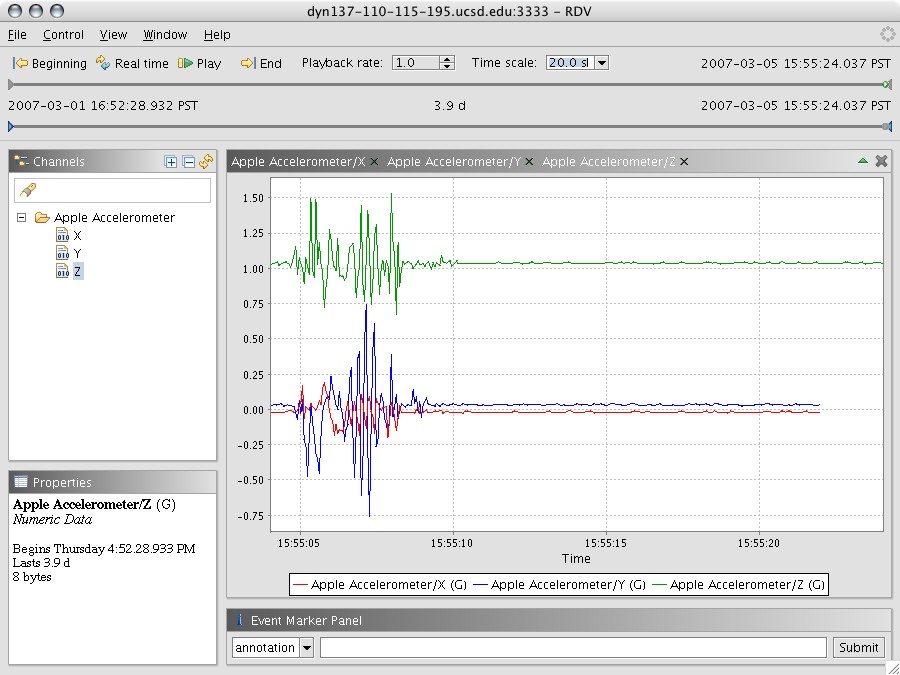
This code gives a selfcontained demo that's pretty neat, one can simply run the various code and have a no-external-parts demo of DataTurbine and RDV:

Code running

Once you have this running, the next thing to integrate is the Apple iSight camera included in all their recent laptops. There are at least two ways to do this:
  1. Use Tomcat, WebDAV and isightcapture to capture single frames periodically. Slow but easy to get running.
  2. Use Terry Weymouth's ISightSource from the dev section of telepresence. This is fast, but uses a lot of CPU for unknown reasons.
I tested both, but Wei Deng took the code and rolled it up into a clean scripted demo. The combination is pretty nifty, you have video plus real data, all on your laptop with no wires required!

Getting the code

Previously, the code was in the CLEOS NEON repository at http://nladr-cvs.sdsc.edu/svn-public/NEON/telepresence/sms-rbnb. However, this has now been moved and is no longer public. I'm not sure if I should set up a neesforge project for it, or put it into the NEESit repository.