
NEESit logo

Revision history

  • 2/16/05 Rewritten from MCS to NEESit, also added module listing
  • 2/16/05 Corrected support email, added dndtester, links
  • 2/25/05 Added nclient
  • Background

    CVS, the Concurrent Version System, is an open-source program for managing shared source code on programming projects. Continuing from the NEESGrid project, NEESit has established a CVS archive for its continued work on the NEES software distribution. This page explains how to get access, whether you want to just get the current code or perhaps contribute as a developer.

    Read versus commit (write) access

    There has been some confusion over what 'commit access' means in terms of CVS. Briefly, you only need commit access if you are a software developer who is contributing code for the NEES distribution.

    Anyone, anywhere, anytime can always get the latest code from CVS. That's what its for, and does not require an account or login. Reading simply uses the anonymous account.

    Accessing the Archive

    There are three things you need to know when looking for code in the repository:
    1. The name of the machine hosting the archive.
    2. The directory on that machine where the repository is located.
    3. The module name of the code.

    (If you're a developer, you also need your login and password)

    For NEESit, the information is:

    1. cvs.nees.org
    2. /disks/cvs/neesgrid
    3. See below for a module listing

    CVS clients

    On Linux/Unix and OSX, please use the built-in CVS command line programs. There are also GUI CVS shells if you prefer those.

    If you have a Windows sytem, Tortise CVS is what we use. It's GPL open source, GUI based, see TortoiseCVS.org for details. It also includes an SSH agent, Pagent, for developer use.

    For example: Getting the Labview code

    There are several projects listed below that you can use; we will use the Labview code for our example. We will 'check out' (CVS terminology for getting the latest copy of something) the NEES DAQ distribution, which is in the 'lv-programs' module.
    1. On Unix/OSX:

      To check out the source from a C shell, do the following

       setenv CVSROOT :pserver:anonymous@cvs.nees.org:/disks/cvs/neesgrid
      cvs co lv-programs
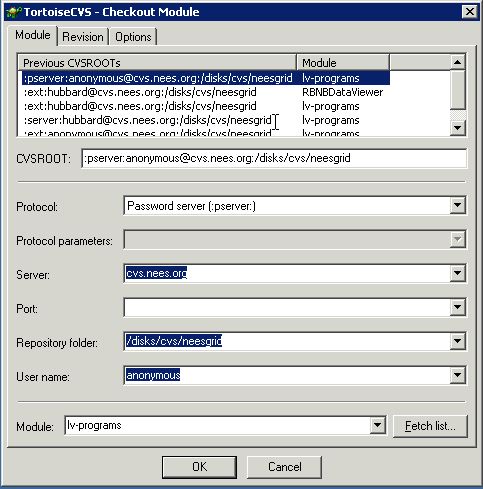
    2. On Windows, after installing TortoiseCVS, right-click and select 'CVS checkout'. Fill out the dialog like this:

      CVS dialog box
    In either case, the result should be a directory/folder called lv-programs.

    CVS Commit mailing list

    If you are a developer working on this code, there is a mailing list that sends out CVS commit messages. This can be very useful to keep tabs on what work is occurring and where.

    To join, please go to this page and subscribe.

    CVS Project Listing

    As of 1/16/05, here are the currently available projects in the archive: (There are several others not being maintained that I've not listed. Email it-support at nees dot org if you need the complete list.)
    1. flog

      The message logging library, from the Fermilab CDF data handling project. Flexible thread-safe message logging, required for nsds-driver, nees-di, and fake_daq

    2. fake_daq

      Separated as of 9/10/03, this is C code to simulate a DAQ system that speaks the standard protocol. POSIX C, 2 threads, hopefully useful as example code. Requires flog and nsds-driver libraries.

    3. dataq-194

      A driver and associated code for the Dataq DI-194 DAQ card, required for nees-di. More information on this page

    4. nees-di

      This reads from a Dataq DI-194 or 194RS, and streams all channels out to the nsds-driver. POSIX C, threaded, requires flog and dataq-194 to compile. Documentation and testing are not complete!

    5. nees-adxl

      A driver for the Crossbow ADXL202EVB 2-axis accelerometer board. Includes a test program and one to stream data to NEES. More information on this page

    6. dndtester

      This is a Java-based protocol validation tool. Please see this page for more information. This is used to verify correctness if you have a custom DAQ talking the NEES TCP/IP protocol.

    7. lv-examples

      TCP sender and receiver in Labview, use these to verify that you can check out binary code correctly.

    8. lv-programs

      All LabView code, as of 10-8-02 or so. DAQ code, API, stress test applications, simulators, MOST code, only lacking a kitchen sink.

    9. NTCP

      NEESGrid Teleoperation Control Protocol. This is the NTCP server code.

    10. ntcp_plugins

      Control plugins for NTCP, e.g. Labview, Matlab, etc.

    11. nclient

      This is the NTCP client from the NTCP tutorial. Useful for debugging as well.

    12. turbine

      This is a catch-all for the Data turbine code. Currently include DAQ, Axis video, thumbnailer, and some misc test code.

    13. NeesVideo

      New Feb 2005, this is code from Ken Ferschweiler at Oregon State for applet-based display of data turbine video and data.

    14. RBNBDataViewer

      New as of Jan 2005, we are now keeping a roughly-sychronized version of Jason Hanley's data viewer (home page) in CVS. This is a Java-based integrated data viewer, with support for both data and video.

    15. orb2nsds

      This is currently-broken code, C-based, to stream data from an Antelope ORB into NEES. Originally written by Balaji Vasu at UCLA, we plan to fix this after the 3.3 release.

    Navigation links

  • Back to NEESit page
  • Back to home page
  • Support

    This work was supported primarily by the George E. Brown, Jr. Network for Earthquake Engineering Simulation (NEES) Program of the National Science Foundation under Award Number CMS-0117853.